 |
|
(12/9/98)
Hi Joseph,
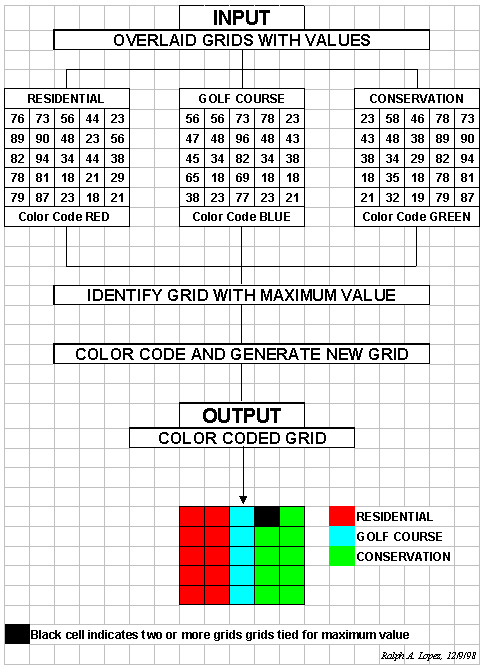
We are trying to solve a problem in land use design using raster-based GIS (ESRI ArcView Spatial Analyst) to no avail. It has to do with the conflict resolution step of the problem. In this step, multiple raster-data layers are overlaid to produce an output grid depicting the most suitable land use based on where the maximum value was found.
Hopefully, the first insert should render our problem transparently clear. (The second insert summarizes my whereabouts for the last 30 years.)
It seems that this cat has never been skinned, or has it? We are researching the literature in the hopes of finding an existing solution; so far nothing. I feel that if you do not know of a solution, probably no one else does.
Your comments would be highly appreciated. Thank you.
Warmest regards,
Ralph A. Lopez, P.E., DEE
____________________________
Ken-- see the attached and read on for an easy (and useful) "new" operation.
Ralph-- I "found" the attachments. I don't know of any "one-step" operation in SA (or any other grid-based package for that matter-- likely my ignorance) that solves your problem-- it contains several "primitive" grid-calc steps. The following solution should work in any grid-based system with "compute" capabilities (the following is in pMAPwin syntax; you need to translate to GRID/Spatial Analyst)...
Step 1. Find the maximum value at each grid
location on the set of input maps
CMD: compute residential maximum golf_course
maximum conservation for max_value
Step 2. Compute the difference between an input
map and the max_value map
CMD: compute residential minus max_value for
difference
Step 3. Reclassify the difference map to isolate
locations where the input map value is equal to the maximum value of the map set (renumber
maps using a binary progression; 1, 2, 4, 8, 16, etc.)
CMD: renumber difference for res_max1
assigning 0 to -10000 thru -1 renumber 0 to 1
Step 4. Repeat steps 2-3 for other input maps
Step 5. Combine individual "maximum"
maps and label final map
CMD: compute res_max1 plus gcourse_max2 plus
conserv_max4 for final
CMD: label final |
1 Residential
2 Golf Course
4 Conservation
3 Res and Gcourse
5 Res and Conserv
6 Gcourse and Conserv
(Note: the sum of binary progression numbers will assign a unique number to all possible combinations)
Ken-- Ralph has identified a simple operation that ought to be part of pMAPwin. How about offering an option to COMPUTE or ANALYZE? That way users can solve the problem in one swoop instead of making them play grid-calc tricks (see above)? The code is easy; the hardest part is fitting it into the right command without violating our syntax or making its use confusing.
__________________________________
Dear Joe,
I thank you for your quick response and apologize for my lack of clarity. Let me try another "cybershot."
The 3 input grids in the inserted example contain suitability-rating values (on a cell-by-cell basis) for unique land uses--residential, golf course, and conservation. The higher the value, the higher the suitability. Each of these grids (or suitability maps) was previously and independently generated. These 3 grids (however they were generated) are inputs to the problem at hand--end of input story.
The problem at hand is strictly one of logic--that is, it does not involve mathematical computations at all. Simply stated, it involves going vertically, on a cell-by-cell basis, through all 3 input grids and identifying on which of the 3 grids the maximum value appears. For example, if in cell "Column 1, Row 4" the maximum value (whatever it happens to be) was found in the RESIDENTIAL input grid, then cell "Column 1, Row 4" in the NEW (output) GRID would simply be colored RED (since that is the user-selected color code for RESIDENTIAL land use.) The output grid is in essence a land use map extracted from the 3 competing land use suitability maps. The output grid has no values (i.e., numbers) associated with it. The output grid is just a color-coded land use map with 3 land uses on it--end of output story.
Again, I'm obliged at your prompt response and hope to hear from you.
_______________________________
Ralph-- The problem is "logical" for humans, but the computer only "sees" numbers so the solution is a series of mathematical primitives. In fact, most grid-based operations are solved by number tricks like the one I suggested for your "new" operation. You don't see the algorithms--just the human-oriented syntax and parameters-- but the number-thing is how the illogical (but mathematical) computer can "see" and solve the problem.
When we code the operation (new option to an existing command) we will initialize a grid with 0's and write to each grid space the "number" of the map(s) that contains the largest value in the the "spear of map values" at each location (need to use the binary progression trick so we can identify ties). For example, consider the top/left cell location.
76
----> intialize as 1 for Map1 (Residential)
56 ----> doesn't beat the current maximum (76) so 1 remains as the
maximum map
23 ----> doesn't beat the current maximum (76) so 1 remains as the
maximum map (Residential)
Lower/right cell would be...
21
----> intialize as 1 for Map1 (Residential)
21 ----> ties (21) so 3 is assigned to indicate 1 and 2 (Residential
and Golf_Course)
87 ----> beats current max (21) so 4 assigned as the maximum map
(Conservation)
To assign colors (gridded maps store numbers, not colors), then the display pallet would assign BrightRed to 1 (Residential), BrightBlue to 2 (Golf_Course), BrightGreen to 4 (Conservation), and Black (or different color for each unique tie combination)-- 3= residential/golf; 5= residential/conservation; 6= golf/conservation; 7= residential/golf/conservation (all). The computer can handle a bunch of unique combinations, but it might make sense to limit the stack to 20 layers. Both "maximum" and "minimum" should be supported.
No one that I know has a logical operator that does what you want... the only other "solution" might be to trick the DOCELL or CONDITIONAL operators in GRID/SA to do what you want, but I am not certain how. The mathematical solution I sent will solve your logical problem, using currently available grid-calc operators in SA (and all other grid-based systems that I know for that matter).
What I suggested to Ken was to develop an option in our COMPUTE command that would do what you want in one swoop-- the BIG BUTTON macro (thanks for the idea; we will implement in a future rev of pMAPwin). It might look like...
CMD:
compute residential maximize golf_course maximize conservation identity for max_map
CMD: compute residential minimize golf_course minimize conservation
identity for min_map
where "identity" is the optional key word that contains the "logical" solution for the input map(s) containing the max (min) value for each grid location.
_______________________________
Dear Joe,
Walla! You're a scholar, a gentleman, and an educator. You turned on a "brain-light" of mine and it felt good. Having missed the "code-writing" revolution, I was near but yet so far. Now I SEE! Thanks.
The inserts are just for your visual delight.
Warmest regards,
Ralph